
One of the most popular crypto wallets in the world is MetaMask. It has more than 30M+ users that use it to hold crypto, access dApps, trade tokens, and discover the world of Web3. You may install it as a browser extension or utilize it in the form of a mobile application. Beginner users prefer MetaMask, as it is easy, fast, and simple to learn.
This tutorial offers a step-by-step process on the use of MetaMask. You get to know how you should install the wallet, how to create your account, save your seed phrase, add new networks, and swap tokens without any complications. You also get tips on how to save, which ensure that your money is safe. It is okay in case you are confused with crypto wallets.
At the end, you will be able to use MetaMask with the desired amount of confidence and prevent the usual errors. You also get to know how to guard your wallet against fraudsters, counterfeit sites, and phishing sites. We shall begin with the installation process.
| Step | Action | Security Tip | Common Mistake |
|---|---|---|---|
| 1 | Download from official site | Only chrome://extensions or metamask.io | Fake sites/phishing |
| 2 | Create wallet | Write seed phrase offline | Storing digitally |
| 3 | Add network (e.g., Ethereum) | Verify RPC URL | Wrong chain → lost funds |
| 4 | Connect to dApp | Check site URL | Fake dApps |
| 5 | Send/Receive | Double-check address | Wrong network |
Step 1: Install MetaMask
MetaMask has to be installed in order to use it. It can be installed on Chrome, Firefox, Brave, or Edge. All browsers have almost the same process. These are easy steps and can be followed to install MetaMask safely.
Go to the official website
It is always important to download MetaMask on the official site.
This will guard against counterfeit copies. Lots of scammers develop the fabricated extensions of some browsers and attempt to steal your seed phrase. And therefore always write the name yourself. Always avoid clicking on the links of other websites and social media randomly.
Once the website metamask.io is open, click Download. Choose your browser. In case it is Chrome, choose the Chrome extension. In case you are a user of Firefox, then choose the Firefox extension.

Install the extension
Your browser will open the extension store. Click Add to Chrome or Add to Firefox. Approve the installation.
After a few seconds, MetaMask appears as a small fox icon in the top-right corner of your browser. Pin it so you can access it easily.
Verify the extension
Click the icon. Check the publisher details. Ensure it refers to MetaMask / Consensys. In case the name does not appear the same, take it away immediately, since it can be a counterfeit.
Once everything seems right, click Get Started. Now, you are now prepared to make your wallet.
3. Step 2: Create Your Wallet
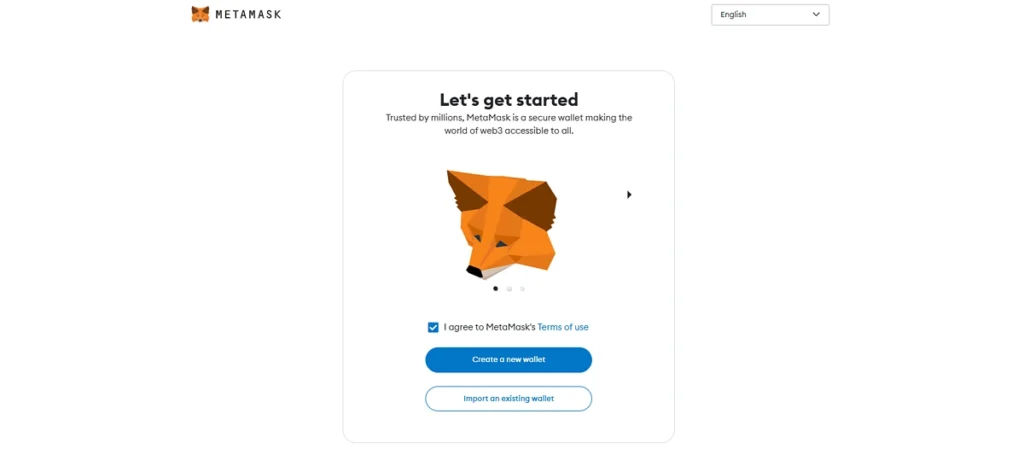
MetaMask then comes up, requesting you to create a new wallet or import an old wallet after the installation. Novices are expected to make a wallet.
Create a new wallet
Click Create a Wallet.
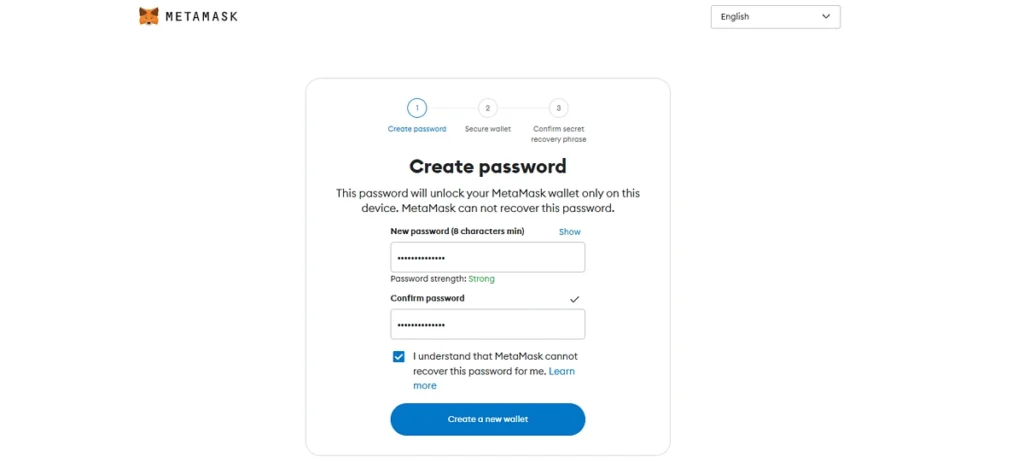
MetaMask displays a short message on the privacy of the data. You can agree or decline. It does not have any impact on your wallet safety.
Next, set a password. You should use a strong password that is not used anywhere else. It is the password that secures your MetaMask on your device. It is not a replacement for your seed phrase.
Understand the seed phrase
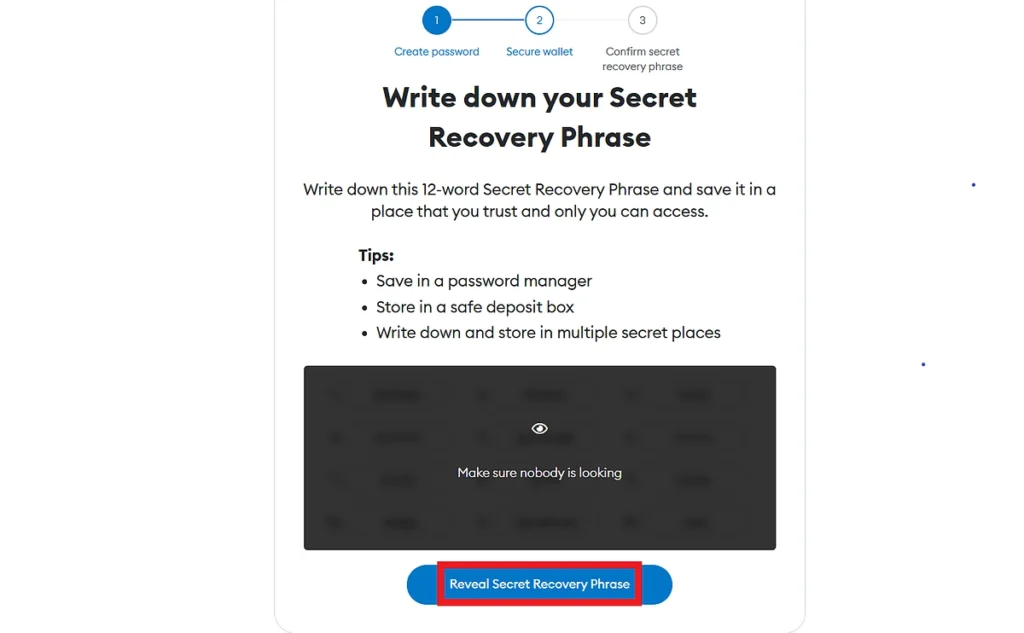
MetaMask now displays your Secret Recovery Phrase, also known as a seed phrase. This is the best thing about your wallet. It is a list of 12 words. These 12 words completely unlock your wallet. Read about MetaMask Official Security Guide.
You have to note them down on paper. Please do not store them on the phone, computer, email, WhatsApp, or cloud. Hackers have access to digital notes. Paper cannot be hacked.
Write the phrase clearly. Check the spelling. Keep the paper in a safe place such as a book or in a drawer. Other individuals take a copy and keep it in two different locations.
Never share your seed phrase
Do not reveal your seed phrase to anybody. It does not require a support team, a site, an app, or even a friend to know. When an individual gets your seed phrase, they can steal all your money. Once the act is done, it is too late.
MetaMask will require you to verify your seed phrase. Once the confirmation is made, your wallet is active.
Your MetaMask wallet is now ready to work.
Don’t miss this important guide Best Crypto Wallets 2026: Ledger vs Trezor
Step 3: Add a Network
The default network linked with MetaMask is Ethereum. This network can accept ETH and ERC-20 tokens. Other networks like Polygon and BNB Smart Chain (BSC) are also used by the majority of people. Such networks have lower fees and speed.
| Network | Chain ID | RPC URL (Example) | Use Case | Notes |
|---|---|---|---|---|
| Ethereum Mainnet | 1 | https://mainnet.infura.io/v3/ | Default | High gas fees |
| Binance Smart Chain | 56 | https://bsc-dataseed.binance.org/ | Low fees | BNB Chain |
| Polygon | 137 | https://polygon-rpc.com/ | Fast/cheap | DeFi/NFTs |
| Arbitrum | 42161 | https://arb1.arbitrum.io/rpc | Layer 2 | Scaling |
| Optimism | 10 | https://mainnet.optimism.io | Layer 2 | Scaling |
Expansion with another network is easy.
Why networks matter
Every Bitcoin blockchain network has its settings. These settings include
- RPC URL (the computer you are connecting to your wallet)
- Chain ID (network unique ID)
- Currency (ETH, MATIC, BNB, etc.)
- Block explorer address (a site to see transactions)
There is no need to know the technicalities. All you have to do is to copy the right numbers. They are used in connecting to the network through MetaMask.
Add Polygon
Click on the network dropdown on the upper part of your MetaMask (Ethereum Mainnet is displayed).
Enter these details:
- Network Name: Polygon
- RPC URL: https://polygon-rpc.com
- Chain ID: 137
- Currency Symbol: MATIC
- Block Explorer: https://polygonscan.com
Click Save.
Your wallet now supports Polygon. You can switch between networks anytime.
Add BSC (BNB Smart Chain)
Click Add Network again.
Enter these details:
- Network Name: BNB Smart Chain
- RPC URL: https://bsc-dataseed.binance.org
- Chain ID: 56
- Currency Symbol: BNB
- Block Explorer: https://bscscan.com
Click Save.
Switch networks easily
The network dropdown will allow you to switch networks. The tokens and the balance in that particular network will be displayed in MetaMask.
At this point, you are now prepared to do swaps.
Step 4: Swap Tokens
MetaMask has an in-built swap service. It can be used to exchange one token with another. The feature will come in handy when you need to exchange ETH for USDT or MATIC for USDC.
Open the Swap tool
Open your wallet. Choose the token to trade. Click Swap.
MetaMask now opens the swap window.
Choose your tokens
You see two fields:
- From (the token you have)
- To (the token you want)
For example:
- From: ETH
- To: USDT
Select the volume to trade. MetaMask will display estimated fees.
Understand slippage
Slippage refers to the price falling or rising a bit since the time of your operations. The slippage is high, and the risk of the loss of value is increased. Beginners can just leave the slippage mode at the default setting.
Understand fees
Swaps require gas fees. The fee associated with using the different networks is different. Ether is normally costlier. Fewer fees are typical of Polygon and BSC.
MetaMask also has a low service fee, which applies to swaps.
Confirm the swap
Once you have checked everything, click Swap. In MetaMask, there is a confirmation. Click Confirm.
Your message becomes part of the blockchain. Wait a moment, and your new token will be in your wallet.
You just did your first exchange.
Pro Tips for Safe and Smart Usage
Use a hardware wallet for large amounts
A hardware wallet is recommended when you have above $1,000 in crypto. A hardware wallet is a device that stores your keys offline. Even when your computer becomes infected, it is inaccessible to hackers. With MetaMask, you are able to connect the hardware wallets such as Ledger or Trezor. Such an addition ensures that your finances remain behind lock and key as you still access, through MetaMask, dApps.
Enable gas alerts to save money
Gas fees change often. The use of MetaMask allows you to keep track of fees so you can get transactions done at a low fee. It will save you money, particularly on Ethereum. These alerts can be turned on and are configured in the settings. Gas trackers can also be used to determine the optimal moments for sending transactions.
The two tips can make you safe and ensure you use MetaMask more effectively.
Final Summary
MetaMask provides an easy and accessible way to experience Web3. You had the chance to read this guide and know how to install MetaMask, create your wallet, and secure your seed phrase in it. You were taught how to incorporate networks such as Polygon and BSC. You got to know how to swap tokens by the built-in swap-lying function. These tips can guide you to begin your cryptocurrency life with clarity and confidence.
Never under-check links, and then be sure to click them. Never use fraudulent extensions and sites. Always store your seed phrase offline. With these rules, it is possible to use MetaMask safely, even as a beginner.
MetaMask unlocks NFTs, DeFi, games, and thousands of dApps. Be patient, do small transactions, and gain confidence gradually.
FAQs
How do I use MetaMask step by step?
You install the MetaMask extension, create a wallet, save your seed phrase, add your preferred network, and then start sending, receiving, or swapping tokens inside the wallet.
Is the MetaMask wallet legal in India?
Yes. In India, the use of MetaMask is not illegal. Nevertheless, crypto regulations can evolve, and one should always adhere to the new governmental policies.
Can I transfer money from MetaMask to my bank account?
No. MetaMask is incapable of directly transferring money to a bank account. To get your money out to the bank, you need to sell your crypto to some centralized exchange and exchange it for INR.
How do I send ETH through MetaMask?
Click on Open MetaMask, choose Send, type in the wallet address of the receiver, type in the quantity of ETH, choose the gas fee, and approve the transaction.
Can I use MetaMask on my phone?
Yes. MetaMask has Android and iOS mobile apps. Install it, import your wallet with the help of the seed phrase, and view or handle your crypto anywhere. Get MetaMask